$lsa=Get-ADDomainController -Filter * | %{Invoke-Command -ComputerName $_.Hostname {ls HKLM:\SYS
TEM\CurrentControlSet\Control\Lsa}}
Now check the $lsa object for "Notification Packages"
For example, you can pipe it to Out-GridView and use the search field.
More info on registering password filters registration :
https://msdn.microsoft.com/en-us/library/windows/desktop/ms721766(v=vs.85).aspx
Thursday, September 29, 2016
Checking for Active Directory password filters
As Microsoft puts it, "Password filters provide a way for you to implement password policy and change notification."
The other day , I read hackers were registering password filters to catch user passwords, following the revelation of the Project Sauron APT .
Therefore, I had to check if any malicious password filters were installed on my domain controllers.
One line of Powershell is enough :-)


Sunday, February 1, 2015
iPhone not syncing after Exchange 2013 migration
My customer was doing a migration from Microsoft Exchange Server 2010 to 2013.
The first step was to setup the coexistence between the old and the new environment.
When the coexistence went live, some users reported they were constantly being prompted for their password on their iPhones.
Root cause
the Active Sync device (in this case iPhone) is not specifying the Active Directory domain.
Workarounds
see the Apple support page for screenshots http://support.apple.com/en-us/HT201729
Solution
Specify a default domain on the IIS servers of the Exchange CAS
http://msexchangeguru.com/2013/08/06/e2013mobiledomain/
Validate solution
Finally, we wanted to check if EAS devices were successfully syncing (=that the problem was gone).
The below (long) command will give you the difference between the last attempt to sync mail and the last succesful attempt.You should pipe this to Export-csv in order to import it into Excel for analysis, sort by the "SyncdiffHours" field to get an idea if any issues are remaining.
The first step was to setup the coexistence between the old and the new environment.
When the coexistence went live, some users reported they were constantly being prompted for their password on their iPhones.
Root cause
the Active Sync device (in this case iPhone) is not specifying the Active Directory domain.
Workarounds
- Recreate the Exchange account on the iPhone solved the problem, setting the domain
- Set the "domain" field to the name of your Active Directory domain on the iPhone
see the Apple support page for screenshots http://support.apple.com/en-us/HT201729
Solution
Specify a default domain on the IIS servers of the Exchange CAS
http://msexchangeguru.com/2013/08/06/e2013mobiledomain/
Validate solution
Finally, we wanted to check if EAS devices were successfully syncing (=that the problem was gone).
The below (long) command will give you the difference between the last attempt to sync mail and the last succesful attempt.You should pipe this to Export-csv in order to import it into Excel for analysis, sort by the "SyncdiffHours" field to get an idea if any issues are remaining.
Get-Mailbox -Filter * -ResultSize Unlimited | %{Get-MobileDeviceStatistics -Mailbox $_}
| select Identity,DeviceModel,LastSyncAttemptTime,LastSuccessSync,@{n="SyncdiffHours";e={(New-TimeSpan -start $_.LastSy
ncAttemptTime -End $_.LastSuccessSync).Hours}}
Monday, August 11, 2014
Powershell - check if members of a group are members of another group
import-module activedirectory

foreach ($u in Get-ADGroupMember -Identity "Users")
{
  if(-not (Get-ADPrincipalGroupMembership $u| ?{$_.Name -eq "Domain Users"})){write-host $u " is missing from Domain Users"}

}
Thursday, July 31, 2014
Poor man's IP to to Username, using Powershell & Domain Controller logs
This customer had many offices and needed to get rid of Windows XP machines.
Due to the lack of inventory and computer management, we were unable to know who were the people behind them!
Ping and remote access were shut off from the host so we couldn't gather information via WMI.
But the LastLogonTimeStamp was being updated for these computers which led us to believe they were still in use.
The solution I came up with : if someone was still using these XP machines, they were authenticating against the domain controllers, and a "logon event" was created with the source ip and the username.
Once you load the quick and dirty function called "Get-UserName-for_PC-by-DC-events (silly name sorry), run these 2 commands to get some results
Import-module ActiveDirectory
Get-ADComputer -Filter {Enabled -eq $true -and operatingsystem -like '*xp*'} -Properties IPv4Address | %{Get-UserName-for-PC-by-DC-events -DCname "DC01" -Ip $_.IPv4Address}
7/31/2014 1:18:33 PM -- john.doe at this address --> 10.26.1.15 using Kerberos
A nice enhancement would be to query all domain controllers.
Finally, your mileage may vary depending on how big your security logs are, how often they rotate and how often these XP users log on (you could run a scheduled task)
Function Get-UserName-for-PC-by-DC-events
{
  param(
        [Parameter(Mandatory=$True)]
        [string]$DCname,
        [Parameter(Mandatory=$True)]
        [string]$Ip
       )
    $xpathfilter = 'Event[System[EventID=4624] and EventData[Data[@Name="IpAddress"]="'+$ip+'"]]'

    Foreach ($event in get-winevent -ComputerName $DCname -LogName Security -FilterXPath $xpathfilter -MaxEvents 1)
    {
        Write-host $event.TimeCreated " -- " $event.Properties[5].Value "at this address --> " $event.Properties[18].Value " using " $event.Properties[9].Value

    }
}
Wednesday, July 16, 2014
DCHP server migration from Debian to Windows Server 2008
My customer wanted to migrate DHCP server function from
Debian Wheezy 7.50 running ISC-DHCP to Windows Server 2008.
The task can broken in 6 parts
get this great AWK parser onto the Debian box https://gist.github.com/mattpascoe/4039747
make it executable
Import the parsed file to your Windows Server
have a look at it to remove errors.
Setup DHCP role on Windows Server
skipping this part as it's pretty self explanatory
Run script
You will need this Powershell module , referred to as "Microsoft.DHCP.Powershell.Admin.psm1" in the script. If Window Server is version 2012 R2 , I guess you can use the DHCP server cmdlets from Microsoft instead.
You will also need to make a Powershell module -which is a combination of this function and this function. Just add one function under the other and put the line "export-modulemember IsIpAddressInRange,Get-IPrange". This module is referred as "IPutil.psm1"
The task can broken in 6 parts
- parse dhcpd.conf on the DHCP server (Linux)
- import the parsed file to your *new* DHCP server
- setup DHCP role on *new*server
- run a script on the *new* DHCP server which creates scopes,pools and reservations (Windows) according to the parsed file.
- manually rename the scopes to "friendly" names
- manually set the server,scope and/or reservation options and scope lease times
get this great AWK parser onto the Debian box https://gist.github.com/mattpascoe/4039747
make it executable
chmod +x dhcpparse.awk
parse the file
cat /etc/dhcp/dhcpd.conf | dhcpparse.awk > dhcp-config.txt
Import the parsed file to your Windows Server
have a look at it to remove errors.
Setup DHCP role on Windows Server
skipping this part as it's pretty self explanatory
Run script
You will need this Powershell module , referred to as "Microsoft.DHCP.Powershell.Admin.psm1" in the script. If Window Server is version 2012 R2 , I guess you can use the DHCP server cmdlets from Microsoft instead.
You will also need to make a Powershell module -which is a combination of this function and this function. Just add one function under the other and put the line "export-modulemember IsIpAddressInRange,Get-IPrange". This module is referred as "IPutil.psm1"
Import-Module .\Microsoft.DHCP.Powershell.Admin.psm1

Import-Module .\IPutil.psm1


#Group by line types

$subnets = Select-String -Pattern 'subnet' -Path .\dhcp-config.txt |%{$_.Line}

$pools = Select-String -Pattern 'pool' -Path .\dhcp-config.txt | %{$_.Line}

$hosts = Select-string -Pattern ‘host’ -path  .\dhcp-config.txt |%{$_.Line}


#Create scopes

$scopes = $subnets |%{$l=$_.Split(','); New-DHCPScope -Server $env:COMPUTERNAME -Address $l[1] -SubnetMask $l[2] -Name $l[3]}


foreach ($scope in $scopes)

{

    # generate all the IP addresses in this scope

    $ips=Get-IPrange -ip $scope.Address -mask $scope.SubnetMask

    # Create pools

    Write-host "Creating pool(s) for " $scope.Address

    foreach ($line in $pools)

    {

        if($ips -contains $line.split(',')[1])

        {

            Add-DhcpIPRange -scope $scope -startaddress $line.split(',')[1] -endaddress $line.split(',')[2]

        }

    }

    # Create reservations

    Write-host "Creating reservation(s) for " $scope.Address

    foreach ($line in $hosts)

    {

        if($ips -contains $line.split(',')[1])

        {

            New-DHCPReservation -scope $scope -IPAddress $line.split(',')[1] -MACAddress $line.split(',')[2] -Description $line.split(',')[4]

        }

    }

}

Write-host “You should now rename the scopes to friendly names”

Write-host “You should manually set options and lease times"
Sunday, February 2, 2014
Wifi break-in notifier
Intro
You've grown paranoid of people who could be stealing your Wifi ?You have the securest form of Wifi encryption ... still wouldn't you like to know STRAIGHT AWAY if someone managed to crack into your network?
Here's a home baked solution ( not suitable for work ) your mileage may vary depending on your Wifi access point.
Concept
Every 5 minutes, a script checks your Wifi access point for unknown Wifi devices.If one of these devices isn't included in a list of Wifi devices you defined, you get an alert on your iPad/iPhone every day until you add it to your list of known Wifi devices.
Requirements
- Raspberry Pi running RaspBMC, powered on & connected to your Wifi 24/7
- Prowl
- Prowl API key
- iOS device - iPhone/iPad
- understanding of Bash/shell scripting
- you need to make a list of your wifi devices as csv
echo "device_owner;device_name;00:23:68:BE:E7:62" >> known_wifi_devices.csv
You need to understand how to get MAC addresses from your modem/router - i have a Zhone router with Adamo, not much I can help you with here, you need to master curl and grep !
The script
nano rogue_devices.sh
# check if all Wifi devices on the router are known MAC addresses

# if unknown, send a notification via Prowl

# run this as "cron job"

APIKEY=xxxxxxxxxxxxxxxxxxxxxxxxxxxxxxxxxxxxxxxxxx


#get the list of MAC addresses from the webpage of my Wifi access point.

html=$(curl -u user:user http://192.168.1.1/wlstationlist.cmd)

echo "$html" | grep -o -E '([[:xdigit:]]{1,2}:){5}[[:xdigit:]]{1,2}'| while read mac

do

# check if MAC address is known

 if grep -i -q $mac /home/pi/known_wifi_devices.csv; then

  echo "OK - $mac is known wifi device"

 else

  #if station in logfile in the last day, just log it.

  if grep -E "^$(/bin/date +"%a %b %d")..............$(/bin/date  +"%Y")" -q /var/log/rogue_wifi_monitor; then

   echo "$(/bin/date +"%a %b %d %T %Z %Y") --- $mac is not a known Wifi device on this network" | tee -a /var/log/rogue_wifi_monitor

  else # log it and notify via Prowl

   echo "$(/bin/date +"%a %b %d %T %Z %Y") --- $mac is not a known Wifi device on this network, admin notified" | tee -a  /var/log/rogue_wifi_monitor

   curl https://api.prowlapp.com/publicapi/add \

       -F apikey=$APIKEY \

       -F application="XBMC Rpi" \

      -F event="Rogue Wifi device detected" \

      -F description="MAC Address $mac is unknown !"

  fi

 fi

done
Configure cron
Configure Cron for the script to run every 5 minutes.crontab -e
*/5 * * * * /home/pi/rogue_devices.sh
If you're curious about what 'cron' does, I recommend this tutorial
Enable cron
Since cron is disabled in RaspBMC, you must enable it.nano .xbmc/userdata/addon_data/script.raspbmc.settings/settings.xml
change sys.service.cron to "true"
Start cron
service cron start
Possible improvements
rotate or truncate log filelog when Wifi device is recognized after being added.
Post your questions in the comments :-)
Monday, October 28, 2013
Raspbmc - control XBMC over VNC
I switched my media center from Windows XP to Raspbmc 10 months ago.
As advertised
Raspbmc is a minimal Linux distribution based on Debian that brings XBMC to your Raspberry Pi. This device has an excellent form factor and enough power to handle media playback, making it an ideal component in a low HTPC setup, yet delivering the same XBMC experience that can be enjoyed on much more costly platforms.The switch from double clicking a movie and navigating folders in Windows XP to pure media center system XBMC is a major shift ! Although in the long run, XBMC is just "better", there are so many concepts to grasp, and I won't even mention the fact that it's all on Linux :-) (if you're not familiar with it)
Since I use my media center on a projector, I need quick access to XBMC without turning on the projector every time (whereas people using it with TV don't have this dilemma)
My wishes were fulfilled with Raspbmc's "July Update" as it includes a VNC server
Setup your Raspberry Pi
Create the vncserver script
nano vncserver
Paste the script of "Hiro Protagonist" from his post #3 (the script in post #1 didn't work for me)Make it executable
chmod +x vncserver
Move it
sudo mv vncserver /usr/local/sbin
You can now start the VNC server
vncserver start
If you want to check if it's running, check if vnc_dispmanx has the default VNC port open (5900)
pi@raspbmc:~$ sudo netstat -lnptu |grep vnc
tcp 0 0 0.0.0.0:5900 0.0.0.0:* LISTEN 3687/vnc_dispmanx
tcp6 0 0 :::5900 :::* LISTEN 3687/vnc_dispmanx
vncserver stop
Connecting with VNC viewerUnsucessful
- from my iPad - using PocketCloud remote desktop
- from my Mac - using screen sharing (see http://www.tech-recipes.com/rx/2837/ from quick instructions) ... this crashed the VNC service and "Screen sharing" never times out.
- from my Mac - using RealVNC viewer
- didn't try from Windows 7 - guessing it would work fine with RealVNC

Although the performance is appalling, it's very useful to play around settings, and of course you're not going to watch a movie through VNC :-)
Don't have a Raspberry Pi ? It's a bargain for a media center, I highly recommend and you get to learn Linux on the way.
Thursday, December 1, 2011
PowerShell - count folders in folders
Counting the number of files in a directory is easy
The problem
An invoice scanning system uploads files to a file server. The directory structure is the following.
\\server\files\<country_code-invoices>\<date>\<invoice_id></invoice_id></date></country_code-invoices>
Here's an German invoice folder scanned on December 1st 2011
\\server\files\DE-invoices\2011-12-01\2ad52000-32d5-4d72-925a-98ac442d2381
The question is : "How many invoices have been created every day by country ?" . The output has to be a table to be analyzed with Excel.
The proposed solution
Get all the country folders
Now it's getting a bit tricky.We'll put a pipeline inside a pipeline!
Because we need to process each date folder in each country folder.
Display the country name and the date folder
DE-invoices 2011-12-01
DE-invoices 2011-11-30
etc..
Display the folder count
outputs
DE-invoices 2011-12-01 5
DE-invoices 2011-11-30 18
etc..
The result can now be imported as CSV file ,using the space character as the separator.
(dir).CountHere's a more complex example that I will break down, like a tutorial. Unlike the previous example, this is taking advantage of the object oriented nature of PowerShell. You should understand about_pipelines before you continue reading
The problem
An invoice scanning system uploads files to a file server. The directory structure is the following.
\\server\files\<country_code-invoices>\<date>\<invoice_id></invoice_id></date></country_code-invoices>
Here's an German invoice folder scanned on December 1st 2011
\\server\files\DE-invoices\2011-12-01\2ad52000-32d5-4d72-925a-98ac442d2381
The question is : "How many invoices have been created every day by country ?" . The output has to be a table to be analyzed with Excel.
The proposed solution
Get all the country folders
dir \\server\files\*-invoicesFor each (% is the operator) country folder ($_ is the pipeline object), display only its name
dir \\server\files\*-invoices | %{$_.Name}
#
Display the date folders for each countrydir \\server\files\*-invoices | %{dir $_}
#
We'll store the country name in $country, to use it later as we bring it up the pipeline.dir \\server\files\*-invoices | %{$country=$_.Name}
#
Now it's getting a bit tricky.We'll put a pipeline inside a pipeline!
Because we need to process each date folder in each country folder.
- For Each country folder display its name
- For Each date folder in a country folder display its name
- For Each date folder, count the number of folders it contains
Display the country name and the date folder
dir \\server\files\*-invoices | %{$country=$_.Name;dir $_ |%{Write-Host $country $_.Name}}
#
outputsDE-invoices 2011-12-01
DE-invoices 2011-11-30
etc..
Display the folder count
dir \\server\files\*-invoices | %{$country=$_.Name;dir $_ |%{Write-Host $country $_.Name (dir $_).count}}
#
outputs
DE-invoices 2011-12-01 5
DE-invoices 2011-11-30 18
etc..
The result can now be imported as CSV file ,using the space character as the separator.
Wednesday, November 16, 2011
Windows PowerShell : consolidate log files
I'm using Windows PowerShell more and more every day, here's a simple example.
The task is to consolidate several csv files.
With command prompt
With Powershell, use Get-Content and Add-Content
Now we have used a "text-based" approach in both cases.
In case you have headers in the .csv file, and you just want to filter out some fields of the CSV file, it will get very complicated with the command prompt.
That's when you have to take a more "object-oriented" approach with PowerShell : check out this article from Microsoft's Scripting Guy, which addresses this particular issue.
Since you can use COM and .Net objects in PowerShell, the possibilities are endless! So instead of developing a VBScript for a task we'll run one time only (not a batch), I use PowerShell interactively.
The task is to consolidate several csv files.
With command prompt
copy/b SoftDistribution*.csv Consolidated_logs.csv
With Powershell, use Get-Content and Add-Content
Get-Content SoftDistribution*.csv | Add-Content Consolidated_logs.csv
Now we have used a "text-based" approach in both cases.
In case you have headers in the .csv file, and you just want to filter out some fields of the CSV file, it will get very complicated with the command prompt.
That's when you have to take a more "object-oriented" approach with PowerShell : check out this article from Microsoft's Scripting Guy, which addresses this particular issue.
Since you can use COM and .Net objects in PowerShell, the possibilities are endless! So instead of developing a VBScript for a task we'll run one time only (not a batch), I use PowerShell interactively.
Monday, July 4, 2011
Microsoft Windows - delete a local user profile whose account is missing from AD
Here's a post on how I helped my helpdesk colleagues to solve a strange problem.
John Doe's user account was deleted from Active Directory (he left the company over a year ago), but we could not delete his local profile on a Windows Server 2003:
NTUSER.DAT is a file containing the user's registry hive. it is loaded in the machine-wide registry under HKEY_USERS.
So we need to unload this user's registry hive, in order to delete his profile in "c:\document and settings"

You need to find out which SID (the S-1-5-21 ..etc) correspond to this user
So check the loaded hives in HKEY_LOCAL_MACHINE\SYSTEM\CurrentControlSet\Control\hivelist
Then go back to HKEY_USERS , select the SID and go to file > unload hive.
You should now be able to delete his profile in "c:\documents and settings"
John Doe's user account was deleted from Active Directory (he left the company over a year ago), but we could not delete his local profile on a Windows Server 2003:
- through the user profiles control panel, it is not present
- deleting the folder in "c:\documents and settings" said ntuser.dat is in use
- The "User Profile Deletion Utility" (delprof) from Windows Server 2003 Resource Kit Tools doesn't find this profile either.
NTUSER.DAT is a file containing the user's registry hive. it is loaded in the machine-wide registry under HKEY_USERS.
So we need to unload this user's registry hive, in order to delete his profile in "c:\document and settings"

You need to find out which SID (the S-1-5-21 ..etc) correspond to this user
So check the loaded hives in HKEY_LOCAL_MACHINE\SYSTEM\CurrentControlSet\Control\hivelist
Then go back to HKEY_USERS , select the SID and go to file > unload hive.
You should now be able to delete his profile in "c:\documents and settings"
Thursday, May 26, 2011
SCCM Metering query
UPDATE 04/10/2011: the main query ("query_metering_data") has been changed, so that it even displays computers with no metering data
In a multinational company,you have to be ready for a software audit.
The people in charge of license control go mad when they realise you have 500 computers with Microsoft Visio Professional, when you are licensed for only 450 copies !
Then you have to find 50 users which have it installed but don't need it. If you ask them , they will all say they use it every day :-)
Software Metering in Configuration Manager is extensively covered on the web, so I will spare you the introduction.
Using SCCM, I wanted to uninstall unused software on PCs automatically, based on Software Metering data.
This can be done and is covered in forums, but my customer wanted to first check who was scheduled for removal. Imagine if you uninstalled Microsoft Project Standard from the laptop of the vice president of IT !
I developped a VB.NET application which is centered around a DataGridView, the data source being the SCCM SQL database server. Here's an overview.
First, list all the metering rules
 Double clicking a metering rule displays the metering data for this metering rule, for the collection specified.
Now here's the core of this : the SQL query to make sense of the metering data.
 I've added a right click menu to remove false positives (like the $PatchCache$ path ). The list can be sorted by any column desired.
My customer uses a list of computers as a CSV file, to assign an uninstall program. This required another tool (which is not covered in this post).
In a multinational company,you have to be ready for a software audit.
The people in charge of license control go mad when they realise you have 500 computers with Microsoft Visio Professional, when you are licensed for only 450 copies !
Then you have to find 50 users which have it installed but don't need it. If you ask them , they will all say they use it every day :-)
Software Metering in Configuration Manager is extensively covered on the web, so I will spare you the introduction.
Using SCCM, I wanted to uninstall unused software on PCs automatically, based on Software Metering data.
This can be done and is covered in forums, but my customer wanted to first check who was scheduled for removal. Imagine if you uninstalled Microsoft Project Standard from the laptop of the vice president of IT !
I developped a VB.NET application which is centered around a DataGridView, the data source being the SCCM SQL database server. Here's an overview.
First, list all the metering rules
Dim query_rules As String = "select productname from v_MeterRuleInstallBase" & _
  " GROUP BY productname ORDER BY productname"

Now here's the core of this : the SQL query to make sense of the metering data.
Dim query_metering_data = "select sys.Name0 AS Name,sys.User_Name0,mru.MeteredFileID,mru.ResourceId,MAX(TimeKey) As TimeKey, MAX(LastUsage) AS 'LastUsage' , MAX(lastseen.LastHWScan) AS 'Last hardware scan',sf.FilePath" & _
            " from v_MeterRuleInstallBase mru" & _
            " LEFT JOIN v_MonthlyUsageSummary mus ON (mru.MeteredFileID = mus.FileID AND mru.ResourceID = mus.ResourceID)" & _
            " JOIN v_r_system sys ON mru.ResourceID = sys.ResourceID" & _
            " JOIN v_GS_WORKSTATION_STATUS lastseen ON mru.ResourceID = lastseen.ResourceID" & _
            " JOIN v_fullcollectionmembership m ON mru.ResourceID = m.ResourceID" & _
            " JOIN v_GS_Softwarefile sf ON m.ResourceID = sf.ResourceID AND mru.meteredFileID = sf.FileID" & _
            " WHERE mru.ProductName = '" & Metering_rule & "'" & _
            " AND m.CollectionID = '" & TextBox_CollectionID.Text & "'" & _
            " GROUP BY sys.Name0,sys.User_Name0,mru.MeteredFileID,mru.ResourceID,sf.FilePath" & _
            " ORDER BY sys.Name0"

- Ensuring the last hardware scan is recent tells you the client looks OK
- The FilePath is helpful, we found people using portable applications run from USB stick were metered!
- Sort by "Last Usage" to find who has not used it the metered software for a long time.
- The desired cells can be copied to excel, or directly as Comma Separated Values with the "Copy to clipboard as CSV"
My customer uses a list of computers as a CSV file, to assign an uninstall program. This required another tool (which is not covered in this post).
Tuesday, January 4, 2011
SCCM Package replication status gadget for Windows 7 Sidebar
Making sure your packages are replicating correctly in your SMS hierarchy is important.
Sometimes, you even want to know as soon as possible when a package has been replicated!
This has been useful when a new office is being build far away, and I want to inform the fields technicians on site when they'll be allowed to push out software.
Therefore, I present the "PackageStatusDetailSummarizer" gadget for Windows 7 Sidebar!
>>DOWNLOAD<<
It's like the "Package Status" view in the "Configuration Manager Console", just neater in a gadget :-)

Inspiration from
To install in Windows 7:
If you want to customize it,just close the gadget and edit the files in the folder you have copied (see the "Windows Sidebar" link)
The possibilites are endless : check the deployment of packages,advertisements, software updates, site health etc..
Sometimes, you even want to know as soon as possible when a package has been replicated!
This has been useful when a new office is being build far away, and I want to inform the fields technicians on site when they'll be allowed to push out software.
Therefore, I present the "PackageStatusDetailSummarizer" gadget for Windows 7 Sidebar!
>>DOWNLOAD<<
It's like the "Package Status" view in the "Configuration Manager Console", just neater in a gadget :-)

Inspiration from
- "Software Updates" gadget of the Configuration Manager SDK Samples
- The WMI class SMS_PackageStatusDetailSummarizer from the SMS SDK
- Windows Sidebar
- Windows Sidebar Object Reference
To install in Windows 7:
- drop the folder "PackageStatusDetailSummarizer.Gadget" in %userprofile%\appdata\Local\Microsoft\Windows Sidebar
- right click on your desktop, choose "Gadgets", you should see it in the list
- right click, "install"
- configure by setting the options, just like a normal gadget
- Be careful with the refresh interval in the options, if you set it to low you can hurt your site's performance.

If you want to customize it,just close the gadget and edit the files in the folder you have copied (see the "Windows Sidebar" link)
The possibilites are endless : check the deployment of packages,advertisements, software updates, site health etc..
Friday, October 1, 2010
Testing Aixiz lasers
I bought some infrared lasser from Aixiz to build an interactive multitouch surface.
To avoid any damage to my eyes, I was wearing Infrared protection glasses from Dragon Lasers
Now, the thing that I hadn't planned was how to power the lasers :-)
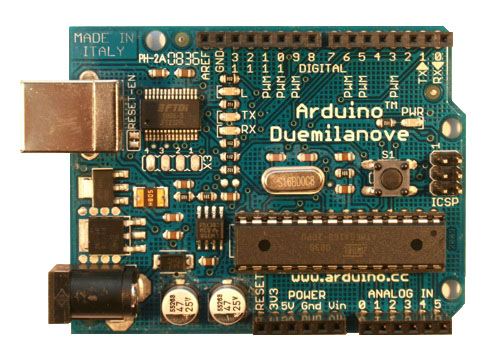
As they are rated at 3.2VDC, drawing approximately 30ma of current, this seems something my Arduino Duemilanovae could do.

Repeat for all the lasers you ordered to make sure they are all working properly...and give a good feedback to Aixiz if you bought your lasers from their eBay store

You can see a bit of the laser in this picture because a picture camera will see infrared (whereas your eyes cannot).
Now I have to find something to power 4 lasers at the same time (something I'm not sure the Arduino can do)
To avoid any damage to my eyes, I was wearing Infrared protection glasses from Dragon Lasers
Now, the thing that I hadn't planned was how to power the lasers :-)
As they are rated at 3.2VDC, drawing approximately 30ma of current, this seems something my Arduino Duemilanovae could do.
- Connect the Arduino to the USB port of the computer
- Connect an infared camera to the computer ( here using a modified PS3eye with a 850nm filter - same wavelength as the lasers)
- Position the camera, and launch a viewer (here using the CL-Eye Test from Code Laboratories )
- Put the protection glasses on, close all doors & windows to the room you're in (and you are alone right!)
- Hook up a laser to the Arduino: red cable on the "3v3" , black cable on "Gnd"
- You should now see the laser beaming (or not) through the viewer
Repeat for all the lasers you ordered to make sure they are all working properly...and give a good feedback to Aixiz if you bought your lasers from their eBay store

You can see a bit of the laser in this picture because a picture camera will see infrared (whereas your eyes cannot).
Now I have to find something to power 4 lasers at the same time (something I'm not sure the Arduino can do)
Wednesday, September 15, 2010
Google Goggles: What's this thing with no name on it?
Every time I came home, I wondered what was this thing nailed to the wall in the hall of my building.
 I couldn't anything written on it either. And I didn't want to take it off to read the back of it.
All I could make out of it was this logo on it.
Enter "Google Goggles"
Install it on your Android phone, then snap a picture with Google Goggles.

That's how I found out that this was some kind of Ubiquiti Wifi bridge. Just by taking a picture of the logo.
I opened a maintenance closet in the staircase, and found a Power-over-ethernet module to power this device, along with an ethernet cable running one floor up.
Someone running a big wifi network around here ;-)

All I could make out of it was this logo on it.
Enter "Google Goggles"
Install it on your Android phone, then snap a picture with Google Goggles.

That's how I found out that this was some kind of Ubiquiti Wifi bridge. Just by taking a picture of the logo.
I opened a maintenance closet in the staircase, and found a Power-over-ethernet module to power this device, along with an ethernet cable running one floor up.
Someone running a big wifi network around here ;-)
Tuesday, September 14, 2010
SCCM : converting programs to Windows 7
This is a VBS program I wrote for a customer, who has a SCCM 2007 R2 environment.
They had over 400 programs in various packages, and they weren't sure if all of them would run under Windows 7.
Visually, we had to make sure this box was ticked.
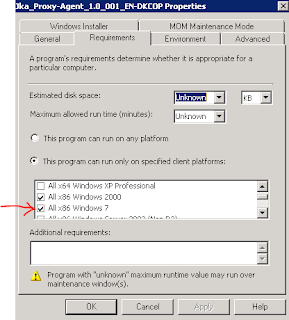
They had over 400 programs in various packages, and they weren't sure if all of them would run under Windows 7.

After a little digging in the SCCM SDK (link), and a script from Stuart James, the following will go through ALL programs in ALL packages. If a program is not set to "Run on all platforms", we add that it can run on "All x86 Windows 7"
It outputs changes with comma separated values (csv) so you can send this to a file and dress it up nice in Excel for your boss :-)
'=====================================
'SetRunFromTS - Sets all programs to be able to run in Windows 7 x86
'Author: Patrick Paumier / Stuart James
'
'Requirements: Change line 22 to connect to your site server
'
'Usage: CScript xxx.vbs or double click
'=====================================


'Check we're using CScript and if not then relaunch
If "CSCRIPT.EXE" <> UCase(Right(WScript.Fullname, 11)) Then
Set WshShell = WScript.CreateObject("WScript.Shell")
WshShell.Run "CSCRIPT.EXE /nologo " & WScript.ScriptFullName
Wscript.Quit
End If

' Setup a connection to the local provider.
Set swbemLocator = CreateObject("WbemScripting.SWbemLocator")
Set swbemServices= swbemLocator.ConnectServer("MY-SCCM-SERVER", "root\sms")
Set providerLoc = swbemServices.InstancesOf("SMS_ProviderLocation")

For Each Location In providerLoc
If location.ProviderForLocalSite = True Then
Set swbemServices = swbemLocator.ConnectServer(Location.Machine, "root\sms\site_" + Location.SiteCode)
Exit For
End If
Next

'Main call
QueryPrograms swbemServices

Sub QueryPrograms(connection)

On Error Resume next

Dim programs
'Dim program
' Run the query.
Set programs = connection.ExecQuery("Select * From SMS_Program WHERE PackageID='TDE0024F'")

If Err.Number<>0 Then
Wscript.Echo "Couldn't get programs"
Wscript.Quit
End If
For Each program In programs
ModifyProgram connection,program.PackageID, program.ProgramName
Next
If programs.Count=0 Then
Wscript.Echo "No packages found"
End If

End Sub

Sub ModifyProgram (connection, existingPackageID, existingProgramName)

' Build a query to get the specified package.
packageQuery = "SMS_Package.PackageID='" & existingPackageID & "'"

' Run the query to get the package.
Set package = connection.Get(packageQuery)
' Output package name and ID.
wscript.echo VBCrLf 'New Line
Wscript.StdOut.Write package.PackageID & "," 'Package ID
Wscript.StdOut.Write package.Name & "," 'Package Name
' Build a query to get the programs for the package.
programQuery = "SELECT * FROM SMS_Program WHERE PackageID='" & existingPackageID & "'"
' Run the query to get the programs.
Set allProgramsForPackage = connection.ExecQuery(programQuery, , wbemFlagForwardOnly Or wbemFlagReturnImmediately)
'The query returns a collection of program objects that needs to be enumerated.
For Each program In allProgramsForPackage
If program.ProgramName = existingProgramName Then
'Get all program object properties (in this case we specifically need some lazy properties).
programPath = program.Put_
Set program = connection.Get(programPath)

' Output the program name
Wscript.StdOut.Write program.ProgramName & "," ' Program Name
Wscript.StdOut.Write program.ProgramFlags & "," 'Program Flags

If program.ProgramFlags AND 2^27 Then
Wscript.StdOut.Write "OK for all platforms"
Else
' RUN_ON_SPECIFIED_PLATFORMS is set.
Win7OK = FALSE
For Each myOS in program.SupportedOperatingSystems
osver = Left(myOS.MinVersion,3)
If osver="6.1" And myOS.Platform="I386" Then
Wscript.StdOut.Write "OK for Windows 7" ' Name: " & myOS.Name & " MinVersion: "& myOS.MinVersion & " MaxVersion: " & myOS.MaxVersion & " Platform: " & myOS.Platform
Win7OK = TRUE
Exit For
End If
Next
If Win7OK = FALSE Then
'Add Windows 7 32bit platform
' Create
Set tempSupportedPlatform = connection.Get("SMS_OS_Details").SpawnInstance_
' Populate tempSupportedPlatform values.
tempSupportedPlatform.MaxVersion = "6.10.9999.9999"
tempSupportedPlatform.MinVersion = "6.10.0000.0"
tempSupportedPlatform.Name       = "Win NT"
tempSupportedPlatform.Platform   = "I386"

' Get the array of supported operating systems.
tempSupportedPlatformsArray = program.SupportedOperatingSystems

' Add the new supported platform values (object) to the temporary array.
ReDim Preserve tempSupportedPlatformsArray (Ubound(tempSupportedPlatformsArray) + 1)
Set tempSupportedPlatformsArray(Ubound(tempSupportedPlatformsArray)) = tempSupportedPlatform

' Replace the SupportedOperatingSystems object array with the new updated array.
program.SupportedOperatingSystems = tempSupportedPlatformsArray

' Save the program.
program.Put_

' Output success message.

Wscript.StdOut.Write "Added Win7"
End If
End If
End If
Next
End Sub
Saturday, September 11, 2010
SyntaxHighlighter with Blogger
I've been away from Blogger for a while, and I'm happy it got some new templates.
I've implemented a syntax highlighter to better view code, it's called SyntaxHighlighter.
Here are the steps to use it on Blogger
I've implemented a syntax highlighter to better view code, it's called SyntaxHighlighter.
Here are the steps to use it on Blogger
- Download SyntaxHighlighter to your computer
- Create a "Google Site" if you don't have one yet
- Create a "File Cabinet" page
- Upload the "shcore.js", the css files and the brushes (=code highlights for specific languages) as described in the SyntaxHighlighter installation notes
- Edit your Blogger template, link the js files and css in to the files you've uploaded (copy the link from "Download" on the file cabinet)
- Use the 'pre' method as described in the installation notes
- Don't forget the inclusion of
SyntaxHighlighter.all()
Wednesday, January 27, 2010
As part of a job interview, I was asked to program a VB script.
The goal was to:
"Disable LAN,WAN,Bluetooth devices as soon as any user (except shopAdmin) makes a login to the Computer (VB).
Hint this is only possible with the extra software piece called Devcon"
How do I start?
In this case, the "hint" meant that since a command line program would be used, some string parsing would be involved. A few Google searches turned up some ideas but nothing as complete as what was requested.
The goal was to:
"Disable LAN,WAN,Bluetooth devices as soon as any user (except shopAdmin) makes a login to the Computer (VB).
Hint this is only possible with the extra software piece called Devcon"
How do I start?
- search on the internet to see if someone else did it. If I judge it's well done, why reinvent what has already been invented?
- search in my scripts if I've already done it or part of it. Most likely, I will reuse generic scripts I made.
In this case, the "hint" meant that since a command line program would be used, some string parsing would be involved. A few Google searches turned up some ideas but nothing as complete as what was requested.
'Assuming devcon is the WINDOWS folder
'Assuming the logged on user has the right to disable devices.

LANadapter = "Broadcom Loca Network Adapter"
BTadapter = "BT adapter"
WLANadapter = "Dell Wireless 1470 Dual Band WLAN Mini-PCI Card"

Set objShell = WScript.CreateObject("WScript.Shell")

Set objNet = CreateObject("WScript.NetWork")

If Not objNet.UserName = "shopAdmin" Then
Set objExecObject = objShell.Exec("cmd /c devcon listclass Net")

Do While Not objExecObject.StdOut.AtEndOfStream

strText = objExecObject.StdOut.ReadLine()

If Instr(strText,LANadapter)>0 Then
ID = Split(strText,"\",3)
Set objExecObject = objShell.Exec("cmd /c devcon.exe disable " & ID(0) & "\" & ID(1) )
WScript.Echo "LAN disabled"

ElseIf Instr(strText,BTadapter )>0 Then
ID = Split(strText,"\",3)
Set objExecObject = objShell.Exec("cmd /c devcon.exe disable " & ID(0) & "\" & ID(1) )
WScript.Echo "Bluetooth disabled"

ElseIf Instr(strText,WLANadapter)>0 Then
ID = Split(strText,"\",3)
Set objExecObject = objShell.Exec("cmd /c devcon.exe disable " & ID(0) & "\" & ID(1) )
WScript.Echo "WLAN disabled"
End If

Loop
End If
Monday, October 26, 2009
Multi touch table - MT Crayon Physics
I've been building a multi touch table as a side project for a year. Since I haven't had a job for a few months, I found the time to bring this to near completion !
For the technical details
I'd like to thank the NUI Group community for all their valuable tips.
For the technical details
- what you are seeing is MTCrayonphysics
- the physical setup is "Rear Diffused Illumination"
- blob tracking is Community Core Vision 1.2
I'd like to thank the NUI Group community for all their valuable tips.
Tuesday, September 29, 2009
A simple application with Processing
I am a big fan of Processing . I will show you a simple application I programmed with it.

As described by the website, it is:
Processing is an open source programming language and environment for people who want to program images, animation, and interactions. It is used by students, artists, designers, researchers, and hobbyists for learning, prototyping, and production. It is created to teach fundamentals of computer programming within a visual context and to serve as a software sketchbook and professional production tool. Processing is an alternative to proprietary software tools in the same domain.
If you don't know how to program, this is a great way to learn, as you can get quick, gratifying results. The latter is very important.
A lot of people give up making their own programs because of the considerable amount of time and things they have to learn before creating something.
If you already know how to program, but you don't practice at work, it will feel great to walk in familiar shoes ! As it's based on Java, you can forget the nightmares you had with other languages like C (pointers..arrr my head hurts!).
I mastered Object Oriented Programming, thanks to Processing ! Also I understood a lot more about computer animation, graphics, how they are rendered...and then you can start doing your own.
You can move on to faster or more complete development environment once you feel confortable. Because, truth be told, the C language is much faster than Processing/Java.
Enough ranting, here is my program, followed by step by step explanations.
You should download Processing, unzip it,launch it, then paste the code into it.
Just hit the play button. You will be asked twice for a file. Choose two different pictures, JPG format. Click around the picture, drag...
You will then understand what this application is about!
Step by step
First, you need the variables to play with: 2 pieces of text ("String") to hold the path to the images, and 2 images ("PImage") to hold the images themselves.
In Processing, you get your stuff ready in the "void setup()" section, before everything starts happening in the "void draw()" section. Note that they are delimited by brackets.
We do the same thing for the second picture..but we keep it into memory without displaying it. Yes, you have noticed we are not using image() on this one !
Now the action starts. The code in "void draw()" is run 60 times per second! This rate is called 60 FPS - frames per second.
So what am I doing for EACH FRAME?
I'm checking if it's true that the mouse button is pressed, and if it's the LEFT mouse button.
In this case, I'll call the "copy()" function. Let's detail this just after the code.
From the reference :
"[..]copies a region of pixels from an image used as the srcImg parameter into the display window.[..]"
So, I am copying a part of the second image("p2"). Actually, I am copying from the same place you clicked - mouseX and mouseY represent the coordinates of the click.
And the size of the block being copied is 20 pixels by 20 pixels.
After copying the bit I wanted, I'm "pasting" it at the same coordinates, the same size.
Think this one thoroughly, keep the application open with the code and the reference.....concentrate !
This line might be the hardest to grasp for newbies, but if you understood this, your imagination can now run wild !
If you want to go further or have an easier start,
do have a look at the Processing website, the reference always comes with examples, or you can go through the tutorials.
More advanced libraries can help you achieve anything : music,3D, animation, movie editing, real time video editing, playing with network and the web, etc, etc....
Or you can just peek at the Exhibition or the eye candy at OpenProcessing

As described by the website, it is:
Processing is an open source programming language and environment for people who want to program images, animation, and interactions. It is used by students, artists, designers, researchers, and hobbyists for learning, prototyping, and production. It is created to teach fundamentals of computer programming within a visual context and to serve as a software sketchbook and professional production tool. Processing is an alternative to proprietary software tools in the same domain.
If you don't know how to program, this is a great way to learn, as you can get quick, gratifying results. The latter is very important.
A lot of people give up making their own programs because of the considerable amount of time and things they have to learn before creating something.
If you already know how to program, but you don't practice at work, it will feel great to walk in familiar shoes ! As it's based on Java, you can forget the nightmares you had with other languages like C (pointers..arrr my head hurts!).
I mastered Object Oriented Programming, thanks to Processing ! Also I understood a lot more about computer animation, graphics, how they are rendered...and then you can start doing your own.
You can move on to faster or more complete development environment once you feel confortable. Because, truth be told, the C language is much faster than Processing/Java.
Enough ranting, here is my program, followed by step by step explanations.
String path1,path2;
PImage p1,p2;

void setup(){
size(640,480);
String path1 = selectInput();
p1 = loadImage(path1,"jpg");
p1.resize(width,height);
image(p1,0,0);

String path2 = selectInput();
p2 = loadImage(path2,"jpg");
p2.resize(width,height);
}
void draw(){
if (mousePressed ==true && (mouseButton == LEFT)){
copy(p2,mouseX,mouseY,20,20,mouseX,mouseY,20,20);
}
}
You should download Processing, unzip it,launch it, then paste the code into it.
Just hit the play button. You will be asked twice for a file. Choose two different pictures, JPG format. Click around the picture, drag...
You will then understand what this application is about!
Step by step
First, you need the variables to play with: 2 pieces of text ("String") to hold the path to the images, and 2 images ("PImage") to hold the images themselves.
String path1,path2;
PImage p1,p2;
In Processing, you get your stuff ready in the "void setup()" section, before everything starts happening in the "void draw()" section. Note that they are delimited by brackets.
- size sets the size of the application to 640 pixels by 480 pixels.
- selectInput calls the dialog to choose a file and stores its path in "path1"
- loadImage loads the image into memory, into the "p1" PImage variable.
- resize set the size of the "p1" Pimage to the "width" and "height" of the application - we stated these previously with size(). Otherwise, the image you've chosen with selectInput might be too big or too small.
- image displays "p1" inside the application window.
We do the same thing for the second picture..but we keep it into memory without displaying it. Yes, you have noticed we are not using image() on this one !
void setup(){
size(640,480);
String path1 = selectInput();
p1 = loadImage(path1,"jpg");
p1.resize(width,height);
image(p1,0,0);

String path2 = selectInput();
p2 = loadImage(path2,"jpg");
p2.resize(width,height);
}
Now the action starts. The code in "void draw()" is run 60 times per second! This rate is called 60 FPS - frames per second.
So what am I doing for EACH FRAME?
I'm checking if it's true that the mouse button is pressed, and if it's the LEFT mouse button.
In this case, I'll call the "copy()" function. Let's detail this just after the code.
void draw(){
if (mousePressed ==true && (mouseButton == LEFT)){
copy(p2,mouseX,mouseY,20,20,mouseX,mouseY,20,20);
}
}
From the reference :
"[..]copies a region of pixels from an image used as the srcImg parameter into the display window.[..]"
So, I am copying a part of the second image("p2"). Actually, I am copying from the same place you clicked - mouseX and mouseY represent the coordinates of the click.
And the size of the block being copied is 20 pixels by 20 pixels.
After copying the bit I wanted, I'm "pasting" it at the same coordinates, the same size.
copy(p2,mouseX,mouseY,20,20,mouseX,mouseY,20,20);
Think this one thoroughly, keep the application open with the code and the reference.....concentrate !
This line might be the hardest to grasp for newbies, but if you understood this, your imagination can now run wild !
If you want to go further or have an easier start,
do have a look at the Processing website, the reference always comes with examples, or you can go through the tutorials.
More advanced libraries can help you achieve anything : music,3D, animation, movie editing, real time video editing, playing with network and the web, etc, etc....
Or you can just peek at the Exhibition or the eye candy at OpenProcessing
Sunday, March 29, 2009
Starting with Blogger
I started this to make eventually a diary of these little experiments in coding and systems.
These are mostly in Microsoft Windows environments, as this is what I use at work.
First I had to customize the Blogger template
http://bguide.blogspot.com/2008/02/three-column-templates-explained.html
I had to test my HTML changes in real time to test quickly
http://htmledit.squarefree.com/
Color names for CSS were needed too
http://www.w3schools.com/css/css_colornames.asp
Escape HTML . I needed to post HTML code samples without Blogger interpreting them
http://www.accessify.com/tools-and-wizards/developer-tools/quick-escape/
These are mostly in Microsoft Windows environments, as this is what I use at work.
First I had to customize the Blogger template
http://bguide.blogspot.com/2008/02/three-column-templates-explained.html
I had to test my HTML changes in real time to test quickly
http://htmledit.squarefree.com/
Color names for CSS were needed too
http://www.w3schools.com/css/css_colornames.asp
Escape HTML . I needed to post HTML code samples without Blogger interpreting them
http://www.accessify.com/tools-and-wizards/developer-tools/quick-escape/
Subscribe to:
Posts (Atom)